Showing posts with label Tools. Show all posts

Market Unlocker v3.0.9 Apk


Market Unlocker v3.0.9 Apk
Size : 476 KB
Requires Android:2.2 and up
Android Market Link - Visit
Developer - Visit

v3.0.9 change log:
- Add "Rate Me" in about dialog
- Minor bug fix
- Render checkbox UI

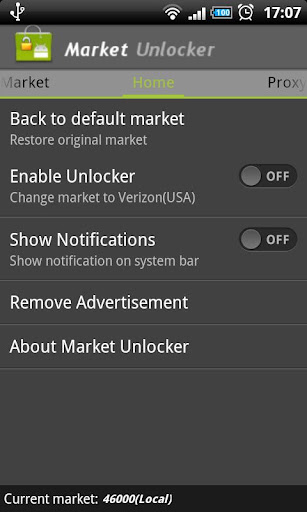
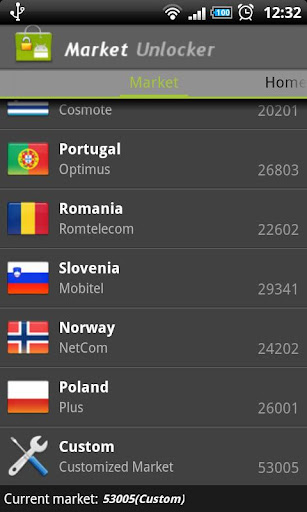
Market Unlocker lets you access paid or restricted apps in Android Market 2.x and 3.x and Amazon Appstore in one click. It's safe, stable, simple and free.

For some apps are just enabled for some specific countries and not available to the other countries,so it is very difficult to download many high quality software. Market Unlocker lets you access paid apps from countries where paid apps are not yet available.

Read more »

AdAway 1.13 Apk


AdAway 1.13 Apk
Size : 496 KB
Requires Android:2.1 and up
Android Market Link - Visit
Developer - Visit

AdAway is the open source ad blocker for Android using the hosts file.
Attention: DEVICE MUST BE ROOTED FOR THIS APPLICATION
AdAway is an open source ad blocker for Android using the hosts file.
Requirements:
• ROOT
• Read/Write access on system-Partition
Problems:

Read more »

Google Translate 2.2 Apk


Google Translate 2.2 Apk
Size : 3.2 MB
Requires Android:1.5 and up
Android Market Link - Visit
Developer - Visit

Google Translate lets you instantly translate between over 50 languages.
Use Google Translate to instantly translate text between more than 50 languages.
Featuring:
* Dictionary results
* Text-to-speech
* Voice input
* Romanization (e.g. Pinyin, Romaji, etc)
* History/star favorite translations

What's in this version:
# Conversation Mode now supports speech-to-speech translation for 12 more languages (French, Italian, German, Portuguese, Dutch Russian, Czech, Turkish, Chinese, Japanese, Korean, Polish).
# Added ability to post-edit and correct speech input in Conversation Mode (requires RECORD_AUDIO permission.)
# Added ability to view translation results in full screen mode


Download

Adobe AIR 3.0.0.408 Apk free apk


Adobe AIR 3.0.0.408 Apk
Size : 8.2 MB
Requires Android:2.2 and up
Android Market Link - Visit
Developer - Visit

Download size of AIR is compressed to 8.3MB. When installed, the binary is uncompressed to 24.4MB on the device. You also have the option to move Adobe AIR to the SD Card. The amount of data that can be moved is dependent on your OS version.
By clicking "Install", you agree to the Software License Agreement found at http://adobe.com/go/eum.

Read more »

Download Market Unlocker v3.2.5


Market Unlocker v3.2.5 Apk
Size : 476 KB
Requires Android:2.2 and up
Android Market Link - Visit
Developer - Visit

v3.2.5 change log:
- Enhanced market detecting to reduce annonying notifications
- Removed background phone state service
- Improved configuring market process
- Improved to show active GSM operator instead of configured one

Market Unlocker lets you access paid or restricted apps in Android Market 2.x and 3.x and Amazon Appstore in one click. It's safe, stable, simple and free.

Read more »

X-plore file manager v2.52 Apk


X-plore file manager v2.52 Apk
Size : 688 KB
Requires Android:2.1 and up
Android Market Link - Visit
Developer - Visit

v2.52 change log:
- Fast fix for APK-related crashes

X-plore is dual-pane file explorer with tree view and root access.

Highlights:
* Dual-pane tree view
* Root access (on rooted devices), also allowing changes to read-only files
* Shows all internal and external memory locations
* Seamless work with Zip (as if it was normal folder)
* Favorites (folders, Zips) displayable in root
* Basic media info about images, video and audio files
* Built-in viewers for images, video, audio, text
* Hex viewer
* Fast Image viewer with zoom and slide to previous/next images in folder
* Thumbnails for images and video as well as for various file types (depending on associated application)
* Ability to clear default application handlers
* Multi-selection - always available, yet not disturbing
* Search files in folders (also in Zip or in search results)
* View APK files as ZIP
* Configurable buttons and key shortcuts


X-plore allows you to see inside of your Android phone or tablet.

This is a dual-pane explorer, which means that there're two folders shown at same time, and common operation such as copying files are done from one pane to another.
And X-plore shows folder hierarchy in a tree view. This offers clear orientation on where in file system you currently are, and fast switching to other location.

Currently selected folder and files are highlighed, while other folders/files have slighly darker background.

You may explore internals of the device, and if you're power user and have your device rooted, you can make changes to system data - backup files, remove unwanted applications, etc.

If you're standard user, you may choose to hide internal memory from view and be sure not to mess with system.
You can comfortably see contents of your external memories, either be it built-in high capacity memory, external memory card, or possibly USB memory stick attached to your tablet. All these memory types are listed in main level, you don't need to search for their folders on the device.

Where it makes sense, X-plore tries to tell more about the file. This means showing thumbnails for images and video, and displaying basic media information about music files.

Main operations are related to managing files and folders - viewing, copying, moving, deleting, compressing to Zip, extracting, renaming, sharing, and more.

Main interaction is done by touch screen, clicking on folders or files to open files, or long-click to open context menu which contains options which can be done on particular clicked item, or multiple selected items.
Multi-selection allows to do operation on more files at once. Files can be selected by clicking check box. It is also possible to select all files in a folder, or clear selection, by clicking parent folder's check box.

Opening file may mean to use one of built-in viewer for most popular file types: images, audio, video and text.
Or you may configure X-plore to use system application for opening files, in which case system-predefined application that can open particular file is launched.

Archives (currently supported is Zip) are displayed as other folders. You may open them, see contents, and do standard operations that you'd do on files - rename, delete, copy from/to, etc. You don't feel other difference from normal file system, other than operation may be slower for larger Zip files due to need of recompression.

Additional interaction is possible by button bar, which is between two panes, and is fully configurable. You may put buttons of your desired operations here, and change ordering.
Buttons in this bar become enabled or disabled automatically depending on if it is possible to perform given operation.

Another input comes from configurable keyboard shortcuts. Many android devices are mainly controlled by touch screens, and have minimal buttons or keys. Even on such device, you may assign action to volume keys.
And on devices with full hardware keyboard, many operations may be (and are by default) assigned to various keys.


Download

AdAway v1.28 Apk


AdAway v1.28 Apk
Size : 496 KB
Requires Android:2.1 and up
Android Market Link - Visit
Developer - Visit

v1.28 change log:
- Now works on devices without cp command
- New debug setting

AdAway is the open source ad blocker for Android using the hosts file.
Attention: DEVICE MUST BE ROOTED FOR THIS APPLICATION

Requirements:
• ROOT
• Read/Write access on system-Partition

Problems:
• On some HTC devices with a 'feature' called S-ON system-Partition is not writable.
More Information can be found in in-app Help screen.


Download

File Expert v4.1.2 Apk


File Expert v4.1.2 Apk
Size : 1.9 MB
Requires Android:2.1 and up
Android Market Link - Visit
Developer - Visit


v4.1.2 change log:
1. Root explorer mode finally finished Beta testing and now released as exclusive feature for all donate users only.
We have sent donate plugin to all previous Paypal donate users.
2. Built-in image viewer now supports multi-touch!
3. Add Polish, Portuguese and Turkish language support
4. Fix some bugs related to Bluetooth OBEX, file copying, batch app uninstall and batch app backup

Powerful File Manager/WIFI File Transfer Web & FTP/App Manager - ALL in ONE
Best & Leading Android file manager of all time with enhanced WIFI sharing and management, root explorer and Bluetooth support! More than 6 millions of users worldwide and still fast growing! Join us today!


* All basic file operations - Copy, Paste, Move, Create and Rename your files and folders
* FTP/HTTP Server - Share & Manage your files without a USB cable, just like with Web Sharing or WIFI File Explorer, but we do even more because we can provide both Web & FTP transferring support. Web management featuring a Windows style interface!
* Root access to system folders and files like Root Explorer. Remount those locations to read write. Requires rooted phone to function. This feature is in BETA testing. Use it on your own risk.
* SMB, FTP, SFTP and FTPS Client - Access your host computer from your phone, using your phone to manage your PC via WIFI with SMB, FTP, SFTP or FTPS
* Bluetooth - Sharing your files over Bluetooth OBEX FTP. Send any files via Bluetooth OPP
* NFC Support. You can use NFC-enabled phone to transfer files and apps.
* WiFi Send. Directly send files via WiFi between File Expert powered phones
* App Manager - Uninstall/Backup apps. We know that many apps on the market can do this, but none can do this work silently. We're the ONLY app that can install and uninstall apps silently, which makes your batch process faster and cooler. Silent capabilities require a rooted phone to function.
* Archive manager - Create and decompress ZIP archive, Decompress RAR. You can view your ZIP/RAR/GZIP/TAR/TGZ/BZ file just like accessing a folder and directly decompress unique files and folders
* Thumbnails - supports jpg/png/mp3/mp4/3gp thumbnails
* Text Viewer
* Image Viewer - supports both local and remote folder
* Search SD card, perform operations on search results
* Help your player to play media that stores on SMB share (your player needs to support HTTP streaming). WE are the ONLY file manager that can directly open some types of videos over SMB network
* File Picker - Let FE to help you anywhere you want :)
* Theme support - Choose themes that you love for FREE!

Why choose FE? Here are the reasons:
1. No ADs and it's FREE
2. Gives you almost everything you need to manage your phone's resources
3. Smaller size than competitors like ES and Astro
4. Acceptable performance
5. Free technical support via email
6. Clear User Interface, and most operations can be done only in touch
7. The ONLY file manager that supports both PC 2 phone & phone 2 PC wifi file transfer and can directly play some videos and music via SMB
8. Root access support
9. Themes

We know that Astro is great but you have to buy Pro version in order to remove annoying ADs. We can provide all functions that Astro does and offer you even more useful features like Web sharing support. Why not give us a try?


Download Or Download

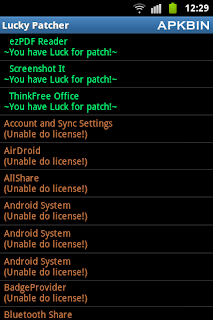
LuckyPatcher v1.0.13 Apk


LuckyPatcher v1.0.13 Apk
Size : 124 KB
Requires Android:1.6 and up | Root
Android Market Link - Visit
Developer - Visit

v1.0.13 change log:
1. Added language selection, and that confused many Russian.
2. Completely reworked the algorithm custom patch, now it is much faster … and even earlier if the patch of the neutron people thought that the device is stuck, in fact it is so long, he patches
3. In about adding version information.
4. The templates custom patch appeared identifiers [BEGIN] and [CLASSES], but the algorithm is compatible with older versions without these identifiers. After the [BEGIN] on the next line writes a description of the patch, for what program, etc. [CLASSES] all the templates patch after the next line will be used to patch classes.dex.
5. [LIB] – now works with the first line in the template (previously it was necessary to press Enter several times to withdraw from the beginning)
6. Added new function “Remove Google Ads”, yet in beta version, will operate extremely rare, but may be somebody somehow will help in some way. Applications that can be patched by this function are marked with “~ Google Ads Found! ~”.
7. Removed one extra signature for “Remove License Verification!”.
8. Added patch for Rocking Shortcuts Lite 1.4
9. Fixed the Russian name of the program in English.
10. Formatted slightly differently in the text about.
11. The results of custom patch have become more informative if it fails.
12. Removed from the list of all system applications.

LuckyPatcher is a great tool to bypass Premium Applications License Verification. Now it can Remove some selected application more applications will add soon. To use this patcher you need a rooted device.

Developed by ChelpuS


Download

LuckyPatcher v1.0.12 Apk


LuckyPatcher v1.0.12 Apk
Size : 124 KB
Requires Android:1.6 and up | Root
Android Market Link - Visit
Developer - Visit

v1.0.12 change log:
- Not Available

LuckyPatcher is a great tool to bypass Premium Applications License Verification. Now it can Remove some selected application more applications will add soon. To use this patcher you need a rooted device.

Developed by ChelpuS


Download

X-plore file manager v2.50 Apk


X-plore file manager v2.50 Apk
Size : 688 KB
Requires Android:2.1 and up
Android Market Link - Visit
Developer - Visit

v2.50 change log:
- Startup password
- Fixes in: root FS, search FS, external cards, streaming from network, Picasa
- Usage statistics

X-plore is dual-pane file explorer with tree view and root access.

Highlights:
* Dual-pane tree view
* Root access (on rooted devices), also allowing changes to read-only files
* Shows all internal and external memory locations
* Seamless work with Zip (as if it was normal folder)
* Favorites (folders, Zips) displayable in root
* Basic media info about images, video and audio files
* Built-in viewers for images, video, audio, text
* Hex viewer
* Fast Image viewer with zoom and slide to previous/next images in folder
* Thumbnails for images and video as well as for various file types (depending on associated application)
* Ability to clear default application handlers
* Multi-selection - always available, yet not disturbing
* Search files in folders (also in Zip or in search results)
* View APK files as ZIP
* Configurable buttons and key shortcuts


X-plore allows you to see inside of your Android phone or tablet.

This is a dual-pane explorer, which means that there're two folders shown at same time, and common operation such as copying files are done from one pane to another.
And X-plore shows folder hierarchy in a tree view. This offers clear orientation on where in file system you currently are, and fast switching to other location.

Currently selected folder and files are highlighed, while other folders/files have slighly darker background.

You may explore internals of the device, and if you're power user and have your device rooted, you can make changes to system data - backup files, remove unwanted applications, etc.

If you're standard user, you may choose to hide internal memory from view and be sure not to mess with system.
You can comfortably see contents of your external memories, either be it built-in high capacity memory, external memory card, or possibly USB memory stick attached to your tablet. All these memory types are listed in main level, you don't need to search for their folders on the device.

Where it makes sense, X-plore tries to tell more about the file. This means showing thumbnails for images and video, and displaying basic media information about music files.

Main operations are related to managing files and folders - viewing, copying, moving, deleting, compressing to Zip, extracting, renaming, sharing, and more.

Main interaction is done by touch screen, clicking on folders or files to open files, or long-click to open context menu which contains options which can be done on particular clicked item, or multiple selected items.
Multi-selection allows to do operation on more files at once. Files can be selected by clicking check box. It is also possible to select all files in a folder, or clear selection, by clicking parent folder's check box.

Opening file may mean to use one of built-in viewer for most popular file types: images, audio, video and text.
Or you may configure X-plore to use system application for opening files, in which case system-predefined application that can open particular file is launched.

Archives (currently supported is Zip) are displayed as other folders. You may open them, see contents, and do standard operations that you'd do on files - rename, delete, copy from/to, etc. You don't feel other difference from normal file system, other than operation may be slower for larger Zip files due to need of recompression.

Additional interaction is possible by button bar, which is between two panes, and is fully configurable. You may put buttons of your desired operations here, and change ordering.
Buttons in this bar become enabled or disabled automatically depending on if it is possible to perform given operation.

Another input comes from configurable keyboard shortcuts. Many android devices are mainly controlled by touch screens, and have minimal buttons or keys. Even on such device, you may assign action to volume keys.
And on devices with full hardware keyboard, many operations may be (and are by default) assigned to various keys.


Download

AdAway v1.27 Apk


AdAway v1.27 Apk
Size : 496 KB
Requires Android:2.1 and up
Android Market Link - Visit
Developer - Visit

v1.27 change log:
- No longer needs busybox
- Fixed problems with reverting
- Method to restart Android changed

AdAway is the open source ad blocker for Android using the hosts file.
Attention: DEVICE MUST BE ROOTED FOR THIS APPLICATION

Requirements:
• ROOT
• Read/Write access on system-Partition

Problems:
• On some HTC devices with a 'feature' called S-ON system-Partition is not writable.
More Information can be found in in-app Help screen.


Download

LuckyPatcher v1.0.11 Apk


LuckyPatcher v1.0.11 Apk
Size : 124 KB
Requires Android:1.6 and up | Root
Android Market Link - Visit
Developer - Visit

v1.0.11 change log:
- Not Available

LuckyPatcher is a great tool to bypass Premium Applications License Verification. Now it can Remove some selected application more applications will add soon. To use this patcher you need a rooted device.

Developed by ChelpuS


Download

Market Unlocker v3.2.5.1 Apk


Market Unlocker v3.2.5.1 Apk
Size : 476 KB
Requires Android:2.2 and up
Android Market Link - Visit
Developer - Visit

v3.2.5.1 change log:
- Fixed no proxy found error on motorola milestone
- Added support page on about dialog
- Added share button on about dialog

Market Unlocker lets you access paid or restricted apps in Android Market 2.x and 3.x and Amazon Appstore in one click. It's safe, stable, simple and free.

For some apps are just enabled for some specific countries and not available to the other countries,so it is very difficult to download many high quality software. Market Unlocker lets you access paid apps from countries where paid apps are not yet available.

Require:
***Get Root permission
***Have installed Android market
***Have installed Amazon appstore (optional)

Features:
***Change provider in one click
***Change provider automatically on boot or switch to flightmode
***Proxy support for market 3.x. It support HTTP, Socks4, Socks5 proxy and user authentication.
***Support Amazon Appstore outside USA.

It is not permanent, will be original after reboot or flight mode! So if you want to back to default market,just reboot or reset flight mode, but you can check "Auto Unlock" to fake it again automatically.

+++++ IMPORTANT UPDATE +++++
You can keep proxy disabled for your market 2.x, only check "Market Unlocker" to enable the function.

To work with new market 3.x,
1. Configure a USA (surely you can use other countries ip if they also support to show paid/restriced apps) proxy server and fill into market unlocker.
2. Enable proxy
3. Choose provider (optional. by default verizon is selected)
4. Check "Market Unlocker" to enable function.
That's all. Open Android market again, paid apps now are back to you. Good luck!

+++++ New update since version 3.0.8 +++++
Amazon Appstore is supported.

Basically Amazon appstore does not allow users to buy paid apps from outside USA, even if users have been registered use US credit card and US address.

Market Unlocker can also set a USA proxy for Amazon appstore to help you buy daily free apps as well as paid apps.

To achieve this:
First install Appstore app, otherwise the function checkbox will not be visible.
1. Go to Proxy tab
2. Configure Proxy Type, Proxy Host, Proxy Port. Please make sure you're using an effect USA proxy server first.
3. Check "Involve Amazon Appstore" button
4. Enable "Enable Proxy" to "ON"
Then open Appstore again, it should now work for you.

Note: There's no need to enable "Enable Unlocker" for Amazon Appstore.


Download

Quadrant Standard Edition v2.0 Apk


Quadrant Standard Edition v2.0 Apk
Size : 1.4 MB
Requires Android:1.5 and up
Android Market Link - Visit
Developer - Visit

v2.0 change log:
- Support for multicore CPUs and ICS
- GUI improvements
- Polish translation
- Fixed low framerate on PowerVR SGX 540
- Due to changes implemented to support new devices this version of Quadrant reports scores different from 1.x releases. The result browser will be restored in the next update, when new benchmark results are available.

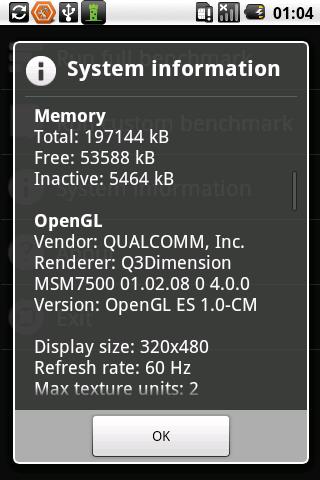
Quadrant is a CPU, I/O and 3D graphics benchmark. The Standard Edition requires an Internet connection to compute benchmark results and is supported by ads.
The application does not work on devices with no GPU (Spica, Tattoo).

This edition may not be used for commercial purposes.


Download

File Expert v4.1.1 Apk


File Expert v4.1.1 Apk
Size : 1.9 MB
Requires Android:2.1 and up
Android Market Link - Visit
Developer - Visit


v4.1.1 change log:
1. Fix all root mode related bugs
2. Optimized Get New Apps loading policy

Powerful File Manager/WIFI File Transfer Web & FTP/App Manager - ALL in ONE
Best & Leading Android file manager of all time with enhanced WIFI sharing and management, root explorer and Bluetooth support! More than 6 millions of users worldwide and still fast growing! Join us today!


* All basic file operations - Copy, Paste, Move, Create and Rename your files and folders
* FTP/HTTP Server - Share & Manage your files without a USB cable, just like with Web Sharing or WIFI File Explorer, but we do even more because we can provide both Web & FTP transferring support. Web management featuring a Windows style interface!
* Root access to system folders and files like Root Explorer. Remount those locations to read write. Requires rooted phone to function. This feature is in BETA testing. Use it on your own risk.
* SMB, FTP, SFTP and FTPS Client - Access your host computer from your phone, using your phone to manage your PC via WIFI with SMB, FTP, SFTP or FTPS
* Bluetooth - Sharing your files over Bluetooth OBEX FTP. Send any files via Bluetooth OPP
* NFC Support. You can use NFC-enabled phone to transfer files and apps.
* WiFi Send. Directly send files via WiFi between File Expert powered phones
* App Manager - Uninstall/Backup apps. We know that many apps on the market can do this, but none can do this work silently. We're the ONLY app that can install and uninstall apps silently, which makes your batch process faster and cooler. Silent capabilities require a rooted phone to function.
* Archive manager - Create and decompress ZIP archive, Decompress RAR. You can view your ZIP/RAR/GZIP/TAR/TGZ/BZ file just like accessing a folder and directly decompress unique files and folders
* Thumbnails - supports jpg/png/mp3/mp4/3gp thumbnails
* Text Viewer
* Image Viewer - supports both local and remote folder
* Search SD card, perform operations on search results
* Help your player to play media that stores on SMB share (your player needs to support HTTP streaming). WE are the ONLY file manager that can directly open some types of videos over SMB network
* File Picker - Let FE to help you anywhere you want :)
* Theme support - Choose themes that you love for FREE!

Why choose FE? Here are the reasons:
1. No ADs and it's FREE
2. Gives you almost everything you need to manage your phone's resources
3. Smaller size than competitors like ES and Astro
4. Acceptable performance
5. Free technical support via email
6. Clear User Interface, and most operations can be done only in touch
7. The ONLY file manager that supports both PC 2 phone & phone 2 PC wifi file transfer and can directly play some videos and music via SMB
8. Root access support
9. Themes

We know that Astro is great but you have to buy Pro version in order to remove annoying ADs. We can provide all functions that Astro does and offer you even more useful features like Web sharing support. Why not give us a try?


Download

One Touch Optimize 1.4 Apk


One Touch Optimize 1.4 Apk
Size : 1.0 MB
Requires Android:1.6 and up
Android Market Link - Visit
Developer - Visit

v1.4 change log:
1. Debug the task list content updating after stopping detection and removal procedure;
2. Debug data storage after modification and optimization;
3. Debug re-entering interface during optimizing process;
4. Correct cache list page load error in some situation.

One Touch Optimize is a cell phone tool which can help you to optimize the phone system effectively by ending unnecessary processes and clearing cache data generated in the process to achieve system optimization function. You can quickly optimize the system by Desktop widget, very easy to use!

Fast and efficient one key to optimize!

Main features:
- System optimization: Ending unnecessary processes and clearing cache data can effectively improve the speed of cell phone to achieve system optimization results.

- Process management: Users can customize to stop system processes, touch-hold to protect some processes.

- Cache clear: Users can choose to clear cache data generated in the process, user-friendly!

- Regular clear: This app will automatically help you to clear useless cache in the background at the set time. Let your phone always in a high performance.

- Desktop Widget: By touching the widget on the desktop to quickly start the "One Touch Optimize" feature.

At busy times, you won't have to open any complex apps, just one touch! Optimize your system immediately!


Download

ES File Explorer v1.6.1.1 Apk


ES File Explorer v1.6.1.1 Apk
Size : 2.1 MB
Requires Android:1.6 and up
Android Market Link - Visit
Developer - Visit

v1.6.1.1 change log:
1) Batch Uninstall
2) Disk Usage Graph
3) Uninstall System App
4) Customize Background
5) Change Language

ES File Explorer for Android is a free, featured all-in-one file manager & application manager & task killer & dropbox client & ftp client which explores your phone and your computer. It allows android users anywhere in the world to manage their resources for free, it makes easy to manage, stay connected using your 3G, EDGE or WiFi, and share with friends, upload photos, watch videos.

Latest Features List :
* File Manager -- Operate files(Copy, Paste, Cut/Move, Create, Delete and Rename, Share/Send) in the phone and computers
* Multiselect files
* Application manager -- Manage apps(Install, Uninstall, Backup, Shortcuts, Category)
* Compress and Decompress ZIP files, Unpack RAR files, can create encrypted (AES 256 bit) ZIP files
* View Different file formats, photos, docs, videos anywhere, support third party applications such as Document To Go to open document files
* Thumbnails for APK,images, and with an inbuilt image browser
* Text viewers and editors
* Search files
* Access your Home PC, via WIFI with SMB
* FTP, it's your FTP client, manage the files on the FTP server as the ones on the sd card
* Dropbox,Box.net,Sugarsync, it's an enhanced cloud storage client other than the official version. It can save photos and videos to your net drive and share your photos and docs, easily edit docs in your account.
* Bluetooth file transfer tool. You can copy and paste files between bluetooth ready devices.It supports OBEX FTP for browsing devices and transfering files between Bluetooth devices.
* Kill tasks, with a one click, pretty simple widget for auto kill, with ignore list to ignore some applications you don't want to kill. It is an advanced task killer to kill running applications and clean memory(This feature needs ES Task Manager module installed)
* Shortcuts, bookmark manager (This feature needs ES Bookmark Manager module installed)
* Root explorer feature. It is the ultimate file management tools for root users. You might access the whole file system and data directories, and change permissions.
* Developers can visit our website for the developer interface for picking files from your applications, email attachments, etc.
* And much more.


Download

AndExplorer v2.2 Apk


AndExplorer v2.2 Apk
Size : 256 KB
Requires Android:1.0 and up
Android Market Link - Visit
Developer - Visit

v2.2 change log:
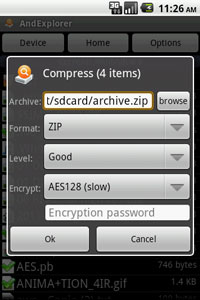
- Standard ZIP encryption support added.
- Android 1.5 support bug fixed.
v2.1:
- Encrypted ZIP (i.e. password protected) support added.
- Search (SDCard) feature added [Pro version only].
- ZIP compression support added [Pro version only].
- Multiple send feature added.
- 80% font scale option added.
- Home folder option added.
- Android 3.2 and 4.0 support.

AndExplorer is a free file manager for Android devices. It allows browsing files and folders stored on device and sdcard. It can sort by name, size and date. Copy/Paste, rename, delete, create folder, send file as email attachment features are available.

It is able to uncompress ZIP, GZIP and TAR files too. Encrypted ZIP are supported. It can be called from another application through Intent facilities. No permission other than storage/write one is needed. AndExplorerPro provides search and ZIP archive support.

Main features:
- List files and folders sorted by name, size and date.
- Open file (HTML, MP3, Text, Video, Office ...) on device.
- APK install support.
- Uncompress support for ZIP, GZIP and TAR files.
- Encrypted ZIP support
- ZIP compression support
- Regular and UTF-8 encoding support for ZIP.
- Multiple files and folders selection support.
- Rename file(s) support.
- Delete file(s) support.
- Create folder(s) support.
- Cut/Copy/Paste support.
- Files/Folders details support.
- Search support
- Send file support (as email attachment, bluetooth, ...).
- Back button support.
- Show hidden files support.
- Optional "Tip of day".
- Intent to select file and/or directory (file extension filtering)
- Intent to Save As...
- Intent to uncompress file into SD Card.
- App2SD support.
- English, French, German, Spanish, Chinese, Japanese, Polish, Russian, Korean, Portuguese, Romanian, Serbian and Brazilian language support.


Download

AdAway 1.24 Apk


AdAway 1.24 Apk
Size : 496 KB
Requires Android:2.1 and up
Android Market Link - Visit
Developer - Visit

v1.24 change log:
- Tcpdump DNS request logging
- Preference to allow redirection rules from Hosts Sources
- New hosts source for mobile ads: http://www.ismeh.com/HOSTS
- Webserver binary now updates correctly from old AdAway versions

AdAway is the open source ad blocker for Android using the hosts file.
Attention: DEVICE MUST BE ROOTED FOR THIS APPLICATION

Requirements:
• ROOT
• Read/Write access on system-Partition

Problems:
• On some HTC devices with a 'feature' called S-ON system-Partition is not writable.
More Information can be found in in-app Help screen.


Download

Copyright © 2012 apk android Powered by Blogger Thanks to Google Bloggers

design and code by CSSReflex, supported by SloDive. Converted by Smashing Blogger for LiteThemes.com.