Showing posts with label GoLauncher Themes. Show all posts

Ice Cream Sandwich (theme) v1.8.0 Apk


Ice Cream Sandwich (theme) v1.8.0 Apk
Size : 4.1 MB
Requires Android:1.6 and up
Android Market Link - Visit
Developer - Visit

v1.8.0 change log:
- New GV icon and native icons for MDPI/XHDPI resolution
- Fix duplicating icon for Travis
- Added graphics for GOWidget Search!

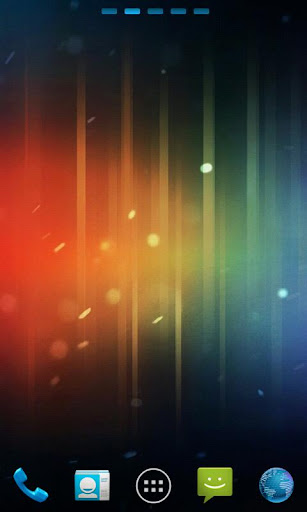
Get the look of Android 4.0 'Ice Cream Sandwich' for your favorite launcher!

Features
★ New graphics for dock bar (ADW & Go)!
★ Themed search widget (ADW only)!
★ Ice Cream Sandwich system icons!
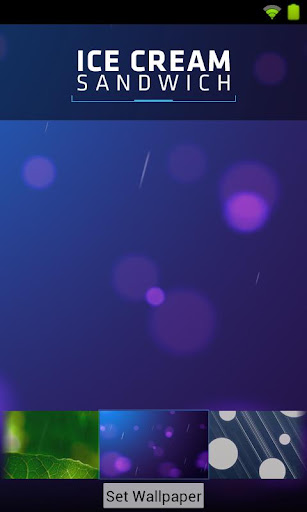
★ Wallpaper pack included
★ ADW Theme support
★ Launcher Pro theme support (limited to icons)
★ Go Launcher EX theme support
★ Support for Desktop Visualizer
★ Support for Folder Organizer

Notes
★This is a theme intended to replicate the look of Android 4.0's launcher & icons. The icons included are to replicate a stock experience and not an interpretation, therefore there won't be any additions other then system apps.

★Regarding 'MovetoSD' availability: If the app is moved to SD Card, you risk the custom icons not loading properly because of how the system loads the SD card.

★Launcher Pro users may need to wipe data if they are having 'Force Close' issues. Phone Settings > Applications > Manage Applications, choose Launcher Pro, select 'Clear Data' and then try to load the icons again.


Download
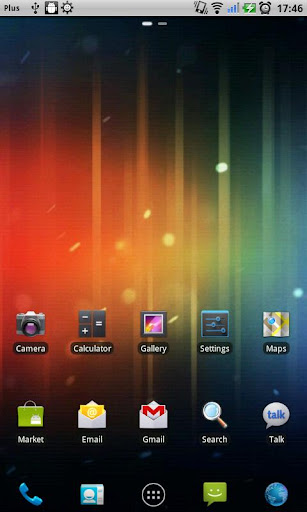
ICS Theme Go Launcher Ex 1.5 Apk


ICS Theme Go Launcher Ex 1.5 Apk
Size : 483 KB
Requires Android:2.0 and up
Android Market Link - Visit
Developer - Visit

This is the most beautiful Ice Cream Sandwich theme in the android market!

Instructions on how to install theme:
1. Download and install this theme.
2. Download Go Launcher EX from the APKBIN if you dont have it installed
3. After downloading Go Launcher EX press the "home" button and select "Go Launcher"
4. Select "Themes Preferences"
5. Select "ICS Theme"


Download

Ice Cream Sandwich (theme) v1.7.4 Apk


Ice Cream Sandwich (theme) v1.7.4 Apk
Size : 4.1 MB
Requires Android:1.6 and up
Android Market Link - Visit
Developer - Visit

v1.7.4 change log:
- Continuing to adjust icon redirection
- Adjusted ADW EX dock slightly
- Adjust push image in menu
- Changed Go drawer push image

Get the look of Android 4.0 'Ice Cream Sandwich' for your favorite launcher!

Features
★ New graphics for dock bar (ADW & Go)!
★ Themed search widget (ADW only)!
★ Ice Cream Sandwich system icons!
★ Wallpaper pack included
★ ADW Theme support
★ Launcher Pro theme support (limited to icons)
★ Go Launcher EX theme support
★ Support for Desktop Visualizer
★ Support for Folder Organizer

Notes
★This is a theme intended to replicate the look of Android 4.0's launcher & icons. The icons included are to replicate a stock experience and not an interpretation, therefore there won't be any additions other then system apps.

★Regarding 'MovetoSD' availability: If the app is moved to SD Card, you risk the custom icons not loading properly because of how the system loads the SD card.

★Launcher Pro users may need to wipe data if they are having 'Force Close' issues. Phone Settings > Applications > Manage Applications, choose Launcher Pro, select 'Clear Data' and then try to load the icons again.


Download
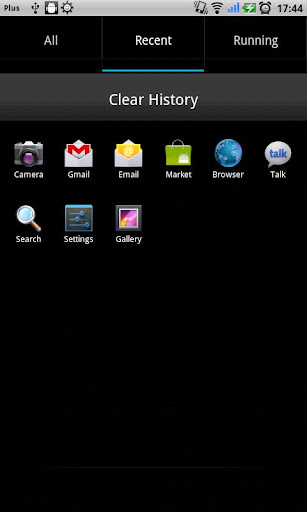
Ice Cream Sandwich (theme) v1.7.1 Apk


Ice Cream Sandwich (theme) v1.7.1 Apk
Size : 4.1 MB
Requires Android:1.6 and up
Android Market Link - Visit
Developer - Visit

v1.7.1 change log:
- Fixes Phone icon for affected phones. Sorry!

Get the look of Android 4.0 'Ice Cream Sandwich' for your favorite launcher!

Features
★ New graphics for dock bar (ADW & Go)!
★ Themed search widget (ADW only)!
★ Ice Cream Sandwich system icons!
★ Wallpaper pack included
★ ADW Theme support
★ Launcher Pro theme support (limited to icons)
★ Go Launcher EX theme support
★ Support for Desktop Visualizer
★ Support for Folder Organizer

Notes
★This is a theme intended to replicate the look of Android 4.0's launcher & icons. The icons included are to replicate a stock experience and not an interpretation, therefore there won't be any additions other then system apps.

★Regarding 'MovetoSD' availability: If the app is moved to SD Card, you risk the custom icons not loading properly because of how the system loads the SD card.

★Launcher Pro users may need to wipe data if they are having 'Force Close' issues. Phone Settings > Applications > Manage Applications, choose Launcher Pro, select 'Clear Data' and then try to load the icons again.


Download

Android4 GO Launcher EX Theme v1.0 Apk


Android4 GO Launcher EX Theme v1.0 Apk
Size : 1.4 MB
Requires Android:2.0 and up / Go Launcher
Android Market Link - Visit
Developer - Visit

Coverz iconz, wallpaper, folderz interface and app drawer. Get it and have a completely new makeover of your smartphone with android OS at once!

Important tips:
This app only works with GO Launcher EX.
Install GO Launcher free from ApkBin

How to Apply the Theme:
1.Please Do Not open directly after it'z installed.
2.Back to GO Launcher EX: MENU > theme preferences.
3.Choose and apply the theme.

Change iconz:
Some devices may not change the icons automatically.
1.Tab and hold an app in desk screens.(Not available in app list.)
2.Replace > Choose the theme'z iconz.

Circle Effect:
1.Only works in App list, MENU > Settings > Icon effect > Chariot


Download

GoLauncher Vending Machine 1.8 Apk (Theme)


GoLauncher Vending Machine 1.8 Apk
Size : 2.1 MB
Requires Android:2.0 and up
Android Market Link - Visit
Developer - Visit

v1.8 update:
- More Icons added, theme additions
- v1.7 Image Optimisation
- v1.6 Initial Release

Be the first to have this very unique Android Vending Machine inside your phone.

Get the tastiest snacks and candies in the palm of your hand with your own portable Android Vending Machine Theme.
No need for coins - everything is free.

This theme requires the GoLauncher Home Replacement application to work. It is not an app you can run. Download GoLauncher from ApkBin if you don't have it already.

* It includes over 50 customised app icons (and counting)
* 2 choices of wallpaper - 4x4 home icon grid and a 5x5 home icon grid. (Menu - Wallpaper - Go Wallpaper)
* Space for widgets without breaking the theme
* For best results and greatest effect I'd suggest the 5x5 icon home grid setup. (Menu - Preferences - Screen Settings - Grid Size)
* Also- In Preferences - Screen Settings - untick the "Normal/ Portrait" checkbox under "home homescreen transition") this will stop the wallpaper sliding around so your snacks fit in perfectly
* You should also set your app drawer to 5X5 icon grid for the best results. (Menu - Preferences - App Drawer Settings - Grid Size)

This is my first of hopefully many GoLauncher Themes.
That's it... I hope you enjoy using it - drop me a line if there is anything you have problems with.

Please rate it if you like it. Please send me suggestions instead of giving me a low rating. I appreciate any input.

Oh yeah! The widgets in the screenshots are:
* "Digital Clock Widget" by Maize, free in the market (fits in real nice with the vending machine - resize the widget to suit you.
* The fantastic GoDevTeam created the Taskmanager 1x1 Widget
* Both available for free on the market
and just to re-iterate...

To Install this Theme YOU MUST have the excellent GoLauncher Ex home replacement application which can be found in ApkBin


Download Or Download

Blue Planet Theme GO Launcher 1.0 Apk


Blue Planet Theme GO Launcher 1.0 Apk
Size : 1.4 MB
Requires Android:2.0 and up
Android Market Link - Visit
Developer - Visit


===Brief introduction:
Designed by ZT.art Team! Covers icons, wallpaper, folders
interface and app drawer. Get it and have a completely new makeover
of your smartphone with android OS at once!

===Important tips:
***This app only works with GO Launcher EX.
***Install GO Launcher free from the market first.
***How to Apply the Theme:
1.Please Do Not open directly after it's installed.
2.Back to GO Launcher EX: MENU > theme preferences.
3.Choose and apply the theme.

***Change icons:
Some devices may not change the icons automatically.
1.Tab and hold an app in desk screens.(Not available in app list.)
2.Replace > Choose the theme's icons.

***Circle Effect:
1.Only works in App list, MENU > Settings > Icon effect > Chariot
Thanks for your support!
Problems and Suggestions to: ztart.theme@gmail.com


Download

Theme Autumn 1.3 Apk - Go Launcher Theme


Theme Autumn 1.3 Apk
Size : 2.3 MB
Requires Android:2.0 and up / Go Launcher
Android Market Link - Visit
Developer - Visit

Autumn Theme for Go Launcher EX
This is a theme for Go Launcher Ex. Kindly download Go Launcher Ex first before downloading the theme.
Theme Created by Azooz for eSeth.net.
Instructions on how to apply theme:
1. Do Not open app directly after it has been installed, it will just force close because this is a theme and not an app.
2. Go to Go Laucher EX - Menu > Themes
3. Choose and apply theme


Note : To use this theme u must install Go Launcher If not Installed Get it Here

Download

Copyright © 2012 apk android Powered by Blogger Thanks to Google Bloggers

design and code by CSSReflex, supported by SloDive. Converted by Smashing Blogger for LiteThemes.com.