Devil Ninja 1.1.5 Apk Size : 3.5 MB Requires Android:2.0 and up Android Market Link - Visit Developer - Visit
Ninja Fighting game,jump over the cliffs and kill enemys on the devil's land Devil Ninja(Full) is a most addictive ninja game in Android Market,In this face paced fighting game,your goal is to kill enemys such as Werewolf,Bat Monster on the devil's land. And there are various props to increase your combat effectiveness. Have fun!
Miracle City 1.0 Apk Size : 21 MB Requires Android:2.0 and up Android Market Link - Visit Developer - Visit
Build your own Miracle City with Friends! Miracle City is a social game to run a city together with your friends. By growing crops, building houses, and mining, you gain money and energy to develop your city. Decorations will please your citizens and so to make them work harder and more efficiently. Visiting and helping your friends often so that you may receive gifts and help from them which will accelerate the development of your city.
GO Launcher EX 2.58 Final Apk Size : 3.2 MB Requires Android:2.0 and up Android Market Link - Visit Developer - Visit
Extended version of GO Launcher, one of the most popular home application.
GO Launcher is a highly customizable home repalcement application, one of the most popular home apps in Android Market, which will run when you press your android phone’s HOME key. GO Launcher EX supports hundreds of themes, fast flip speed and tons of useful functions. Read more »
Viber : Free Calls & Messages 2.1.1.116380 Apk Size : 4.3 MB Requires Android:2.0 and up Android Market Link - Visit Developer - Visit
Viber - Be Free to Communicate. Call and text anyone, anywhere. Viber is an Android* and iPhone application that lets you make free phone calls and send free text messages to other users that have Viber installed. When you use Viber, your phone calls to any other Viber user are free, and the sound quality is much better than a regular call. You can call any Viber user, anywhere in the world, for free and now also text them. All Viber features are 100% FREE and do not require any additional “in application” purchase. Read our privacy policy here: http://www.viber.com/privacy ******************************************************
Angry Piggy (Adventure) v1.1.8 Apk Size : 8.7 MB Requires Android:2.0 and up Android Market Link - Visit Developer - Visit
FEATURES •Transferred from an awesome iOS game with the same title •Alternative controls: either gravity sensitivity or virtual buttons that are easy to use and just feel right •Over 40 challenging and puzzling physics-based levels •Over 40 Achievements and Leaderboards to compete with your friends •Switch between characters to perform best teamwork •Explore the unique islands from Ukurawe to Hoddanfield: unlockable challenges, secrets and rewards •Dramatic and dreamy art design which looks amazing on your device •Original soundtrack with an emotive piano tune •And more fun!
Firefox Web Browser 7.0.1 Final Apk Size : 14 MB Requires Android:2.0 and up Android Market Link - Visit Developer - Visit
Get the official Firefox Web browser. The Mozilla Firefox Web browser brings the best of desktop browsing to mobile. It’s fast, easy to use and customizable, with the latest security and privacy features to help you stay safe online.
Firefox Web Browser Features: *Awesome Screen Browse your favorite sites with minimal or no typing. *Sync Access your browser history, bookmarks, passwords and open tabs from any device. *Add-ons Customize your browser quickly and easily. *Speed Get to the Web and find what you’re looking for fast.
The creation process of GO Photo is around two cores: 1.Make photo looks good. 2. Make sharing easy. For the 1st purpose we've created 14 effects. For the latter we've done a social network where everyone can share newest photos and interact with each other. The photo can also be shared easily to Facebook, Twitter, Email and SMS.
GO Launcher EX v2.80 Final Apk
Size : 4.3 MB
Requires Android:2.0 and up
Android Market Link - Visit
Developer - Visit
v2.80 change log:
1. (New) Support holistic theme which can change themes of launcher, widget and locker (Use GO Store to download)
2. (New) Homescreen folder supports to custom icon position
3. (New) Gesture settings add a new option for screen lock (If you use the feature, make sure clean the permission before uninstallation.)
4. (Improve) Rearrange the option list of gesture settings
5. (Fix) Error of folder background when overlapping icons
6. (Fix) Wrong default grid size of Galaxy Nexus
Extended version of GO Launcher, one of the most popular home application.
GO Launcher is a highly customizable home repalcement application, one of the most popular home apps in Android Market, which will run when you press your android phone’s HOME key.
GO Launcher EX supports hundreds of themes, fast flip speed and tons of useful functions.
Features:
- Hundreds of themes
- Fancy home screen transition
- Smooth scrolling experience
- Icon popup menu
- Folder and task manager in app drawer
- Gesture supported
- Scrollable & resizable widgets supported
Fixed:
- Add shortcut of GO Launcher (Long press home screen-Shortcut- GO Launcher).
- Synchronize home folder and app draw folder.
- Directly drag to change app icon on dock bar.
- Directly open folder on dock bar.
- Add 3D transition for vertical continuous scrolling (MENU-Preferences-Effects Settings-Vertical scroll effect).
- Support single screen wallpaper (MENU-Preferences-Screen Settings-Normal/Portrait Wallpaper).
Tips:
1. Pinch fingers to enter preview screen and edit home screen pages
2. Search “go launcher theme” to get themes and select them in “Themes preferences”
3. Set screen transition and flip speed in “Display settings”
4. Long press icons on home screen to active popup menu
5. Long press icons in app drawer to edit location, uninstall apps and create folders
6. If you can't set GO Launcher as your default home, download "Home manager"
Important:
1. This is a totally free application and we need directly call phone numbers permission to enable the direct dial shortcut on home screen.
2. We will bring out some charged apps like themes and widgets, but most of our apps are free!
3. The weather and clock widget in screenshots belongs to GO Weather, one of the applications developed by our team!
4. The other widgets in screenshots are our GOwidgets, try to search and download them in Android Market!
5. Download our “Classic Theme GO Launcher EX” to get the wallpaper!
6. GO Dev team has released GO Launcher EX, GO SMS, GO Weather and GO Contacts. More and more applications are coming soon!
Think of an extreme makeover to your phone? Try this out!
GO Launcher EX v2.82 Final Apk Size : 4.3 MB Requires Android:2.0 and up Android Market Link - Visit Developer - Visit
v2.82 change log: Attention: Lock screen function will prevent uninstallation of GO Launcher, make sure to deactivate GO Launcher via menu-> settings-> security-> select device administrators before uninstallation. 1. (Improve) Better user experience and interface of folder (We will bring out new interface of folder soon!) 2. (Improve) Change the option list of gesture settings 3. (Fix) Some freeze errors caused by loading SD card 4. (Fix) Other bugs of app drawer and folders
Extended version of GO Launcher, one of the most popular home application. GO Launcher is a highly customizable home repalcement application, one of the most popular home apps in Android Market, which will run when you press your android phone’s HOME key. GO Launcher EX supports hundreds of themes, fast flip speed and tons of useful functions.
Features: - Hundreds of themes - Fancy home screen transition - Smooth scrolling experience - Icon popup menu - Folder and task manager in app drawer - Gesture supported - Scrollable & resizable widgets supported
Fixed: - Add shortcut of GO Launcher (Long press home screen-Shortcut- GO Launcher). - Synchronize home folder and app draw folder. - Directly drag to change app icon on dock bar. - Directly open folder on dock bar. - Add 3D transition for vertical continuous scrolling (MENU-Preferences-Effects Settings-Vertical scroll effect). - Support single screen wallpaper (MENU-Preferences-Screen Settings-Normal/Portrait Wallpaper).
Tips: 1. Pinch fingers to enter preview screen and edit home screen pages 2. Search “go launcher theme” to get themes and select them in “Themes preferences” 3. Set screen transition and flip speed in “Display settings” 4. Long press icons on home screen to active popup menu 5. Long press icons in app drawer to edit location, uninstall apps and create folders 6. If you can't set GO Launcher as your default home, download "Home manager"
Important: 1. This is a totally free application and we need directly call phone numbers permission to enable the direct dial shortcut on home screen. 2. We will bring out some charged apps like themes and widgets, but most of our apps are free! 3. The weather and clock widget in screenshots belongs to GO Weather, one of the applications developed by our team! 4. The other widgets in screenshots are our GOwidgets, try to search and download them in Android Market! 5. Download our “Classic Theme GO Launcher EX” to get the wallpaper! 6. GO Dev team has released GO Launcher EX, GO SMS, GO Weather and GO Contacts. More and more applications are coming soon! Think of an extreme makeover to your phone? Try this out!
Dolphin Browser HD v7.5.0 Apk Size : 3.3 MB Requires Android:2.0 and up Android Market Link - Visit Developer - Visit
v7.5.0 change log: - Fixed Dolphin Sonar crash issues - Fixed Google Search issue reported by French/Italian users
Dolphin Browser HD is a professional mobile browser presented by Mobotap Inc. Dolphin browser HD is the most advanced and customizable Web browser. With maximum speed and efficiency, you can browse using the Dolphin browser HD network. Experience features include additional components, signs, labels, bookmark folders, multi-touch pinch zoom, user agent switch, save the page, download, and so on.
What makes Dolphin better than others? ✓ Webzine Changes the way we browse the mobile web ✓ Add-ons Do customize your own browser, and make your browser look and function the way you want. ✓ Gestures Use gestures for easy navigation while surfing the Internet. You can draw any pattern for any sites & actions. ✓ Unlimited Tabs Enjoy desktop class web browsing experience. Create as many tabs as you need, quickly switch between opened web pages and open links in new tabs. ✓ Manage Bookmarks Dolphin excels bookmark management. Add bookmarks, create multiple nested folders. ✓ Bookmark Favorite Web Pages You can add your favorite web pages to the bookmarks. Open a new tab and quickly navigate to any preferred web site. ✓ Save Web Pages You can save web pages to read them offline with all images preserved. ✓ Find on Page Easily find a word on the web page. Work great for long articles. ✓ Turn on Desktop Browsing You can set Dolphin to browse desktop versions of the web sites. ✓ Stay Private Enabling private mode will stop the browser from remembering history. ✓ Colorful theme pack Decorate your own browser with the color you want. ✓ Your Mother Tongue supported 16 languages supported, eliminate the strangeness on other languages.
Dolphin Browser HD v7.4.1 Apk Size : 3.3 MB Requires Android:2.0 and up Android Market Link - Visit Developer - Visit
v7.4.1 change log: 1. Dolphin Sonar Dolphin listens and lets you use your voice to search, share, bookmark, navigate and more. it is so easy to use; 2. Webzine Add-on We have transformed our magazine style reader into an Add-on for our avid readers. click to download:https://market.android.com/details?id=com.dolphin.browser.magazines 3. Add-ons: We have preloaded the 2 most popular Add-ons 4. Sensitivity of Sidebars: Made Sidebar less sensitive and added indicating arrows. 5. Update to fix security issues
Dolphin Browser HD is a professional mobile browser presented by Mobotap Inc. Dolphin browser HD is the most advanced and customizable Web browser. With maximum speed and efficiency, you can browse using the Dolphin browser HD network. Experience features include additional components, signs, labels, bookmark folders, multi-touch pinch zoom, user agent switch, save the page, download, and so on.
What makes Dolphin better than others? ✓ Webzine Changes the way we browse the mobile web ✓ Add-ons Do customize your own browser, and make your browser look and function the way you want. ✓ Gestures Use gestures for easy navigation while surfing the Internet. You can draw any pattern for any sites & actions. ✓ Unlimited Tabs Enjoy desktop class web browsing experience. Create as many tabs as you need, quickly switch between opened web pages and open links in new tabs. ✓ Manage Bookmarks Dolphin excels bookmark management. Add bookmarks, create multiple nested folders. ✓ Bookmark Favorite Web Pages You can add your favorite web pages to the bookmarks. Open a new tab and quickly navigate to any preferred web site. ✓ Save Web Pages You can save web pages to read them offline with all images preserved. ✓ Find on Page Easily find a word on the web page. Work great for long articles. ✓ Turn on Desktop Browsing You can set Dolphin to browse desktop versions of the web sites. ✓ Stay Private Enabling private mode will stop the browser from remembering history. ✓ Colorful theme pack Decorate your own browser with the color you want. ✓ Your Mother Tongue supported 16 languages supported, eliminate the strangeness on other languages.
Dolphin Browser HD v7.4.0 Apk Size : 3.3 MB Requires Android:2.0 and up Android Market Link - Visit Developer - Visit
v7.4.0 change log: 1. Dolphin Sonar Dolphin listens and lets you use your voice to search, share, bookmark, navigate and more. it is so easy to use; you may just forget how to type. 2. Webzine Add-on We have transformed our magazine style reader into an Add-on for our avid readers. click to download:https://market.android.com/details?id=com.dolphin.browser.magazines 3. Add-ons: We have preloaded the 2 most popular Add-ons 4. Sensitivity of Sidebars: Made Sidebar less sensitive and added indicating arrows.
Dolphin Browser HD is a professional mobile browser presented by Mobotap Inc. Dolphin browser HD is the most advanced and customizable Web browser. With maximum speed and efficiency, you can browse using the Dolphin browser HD network. Experience features include additional components, signs, labels, bookmark folders, multi-touch pinch zoom, user agent switch, save the page, download, and so on.
What makes Dolphin better than others? ✓ Webzine Changes the way we browse the mobile web ✓ Add-ons Do customize your own browser, and make your browser look and function the way you want. ✓ Gestures Use gestures for easy navigation while surfing the Internet. You can draw any pattern for any sites & actions. ✓ Unlimited Tabs Enjoy desktop class web browsing experience. Create as many tabs as you need, quickly switch between opened web pages and open links in new tabs. ✓ Manage Bookmarks Dolphin excels bookmark management. Add bookmarks, create multiple nested folders. ✓ Bookmark Favorite Web Pages You can add your favorite web pages to the bookmarks. Open a new tab and quickly navigate to any preferred web site. ✓ Save Web Pages You can save web pages to read them offline with all images preserved. ✓ Find on Page Easily find a word on the web page. Work great for long articles. ✓ Turn on Desktop Browsing You can set Dolphin to browse desktop versions of the web sites. ✓ Stay Private Enabling private mode will stop the browser from remembering history. ✓ Colorful theme pack Decorate your own browser with the color you want. ✓ Your Mother Tongue supported 16 languages supported, eliminate the strangeness on other languages.
GO Launcher EX v2.81 Final Apk Size : 4.3 MB Requires Android:2.0 and up Android Market Link - Visit Developer - Visit
v2.81 change log: 1. (New) Try the clean rubbish data option to avoid duplicated icons (in advanced settings) 2. (Improve) No hidden icons will show up in recent tab 3. (Improve) The response speed of creating app drawer folder 4. (Fix) Duplicated icons error of app drawer folder 5. (Fix) Home screen rendering problem when using themes
Extended version of GO Launcher, one of the most popular home application. GO Launcher is a highly customizable home repalcement application, one of the most popular home apps in Android Market, which will run when you press your android phone’s HOME key. GO Launcher EX supports hundreds of themes, fast flip speed and tons of useful functions.
Features: - Hundreds of themes - Fancy home screen transition - Smooth scrolling experience - Icon popup menu - Folder and task manager in app drawer - Gesture supported - Scrollable & resizable widgets supported
Fixed: - Add shortcut of GO Launcher (Long press home screen-Shortcut- GO Launcher). - Synchronize home folder and app draw folder. - Directly drag to change app icon on dock bar. - Directly open folder on dock bar. - Add 3D transition for vertical continuous scrolling (MENU-Preferences-Effects Settings-Vertical scroll effect). - Support single screen wallpaper (MENU-Preferences-Screen Settings-Normal/Portrait Wallpaper).
Tips: 1. Pinch fingers to enter preview screen and edit home screen pages 2. Search “go launcher theme” to get themes and select them in “Themes preferences” 3. Set screen transition and flip speed in “Display settings” 4. Long press icons on home screen to active popup menu 5. Long press icons in app drawer to edit location, uninstall apps and create folders 6. If you can't set GO Launcher as your default home, download "Home manager"
Important: 1. This is a totally free application and we need directly call phone numbers permission to enable the direct dial shortcut on home screen. 2. We will bring out some charged apps like themes and widgets, but most of our apps are free! 3. The weather and clock widget in screenshots belongs to GO Weather, one of the applications developed by our team! 4. The other widgets in screenshots are our GOwidgets, try to search and download them in Android Market! 5. Download our “Classic Theme GO Launcher EX” to get the wallpaper! 6. GO Dev team has released GO Launcher EX, GO SMS, GO Weather and GO Contacts. More and more applications are coming soon! Think of an extreme makeover to your phone? Try this out!
Get the official Firefox Web browser. The Mozilla Firefox Web browser brings the best of desktop browsing to mobile. It’s fast, easy to use and customizable, with the latest security and privacy features to help you stay safe online.
Firefox Web Browser Features:
*Awesome Screen Browse your favorite sites with minimal or no typing.
*Sync Access your browser history, bookmarks, passwords and open tabs from any device.
*Add-ons Customize your browser quickly and easily.
*Speed Get to the Web and find what you’re looking for fast.
*Tabs Enjoy the convenience of tabbed browsing on the go.
*Personas Dress up your browser the way you like it.
*Sharing Use apps like Google, Twitter and Facebook to keep your friends in the loop.
*Location-Aware Browsing Get better, more relevant information when on the go.
*Bookmarking Swipe to the left and bookmark any site with one touch.
GO Locker 1.11 Final Apk Size : 861 KB Requires Android:2.0 and up / Go Launcher Android Market Link - Visit Developer - Visit
v1.11 change log: 1.(New) Add GO Locker background in the Wallpaper setting.ALL GO Locker Theme’s wallpapers,which you have installed, can be set. 2. (Improve) Enter the Recent call page while using dialer unlocker with missing calls. 3. (Fix) System PIN unlock page is useless after turn on the phone or reset from airplane mode with set PIN to lock the SIM card. 4. (Fix) Lock Screen while calling with SIM2,double SIM phone. 5. (Fix) Some FC bugs. Fourkey, Sense theme with custom shortcuts is coming soon.
GO Locker,design to GO Launcher EX is the most simple locker for Android! Notice! Here comes the version of GO Locker.
Features: 1. Cool Locker Screen that makes your phone outstanding; 2. Good compatibility with GO Launcher EX and it is stable; 3. Easy to use; 4. Able to activate phone, SMS and Camera directly; 5. Various of Locker Themes to match your style; 6. Emergency unlock enabled;
Tips: 1. Make sure GO Launcher EX V2.58 or above has been installed; 2. Click “MENU—-Preferences—-Theme Settings—-GO Locker” to use it after installed; 3. Click “My locker” to preview and Download more Locker themes;
Contract Killer v1.5.1 Apk Size : 3.3 MB Requires Android:2.0 and up Android Market Link - Visit Developer - Visit
v1.5.1 change log: - NEW Mission Type: Test Out The Best Weapons - NEW Mission Objectives: KILL BOSSES SILENTLY - NEW Daily Co-Op Challenges To Complete - NEW Weapons: Dual Wield & The Machine Gun! - NEW GEAR: Cybernetic Scope & Ultrasound Emitter - NEW Daily Deals: Save big on the best weapons! - NEW Achievements: Earn all 1000 points!
Enforcer or Assassin, call it what you like - you're a CONTRACT KILLER. They might call you an enforcer, or an assassin. Call it what you like - you're a CONTRACT KILLER.
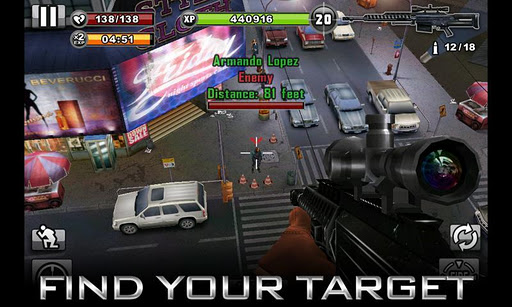
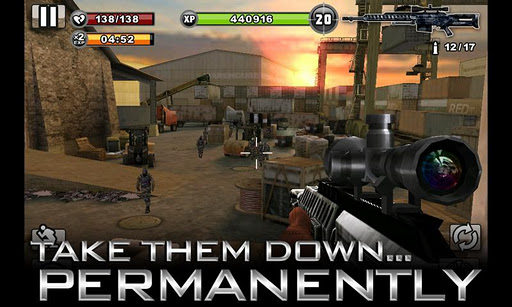
Pulled into a world of bounty hunters, mobsters and criminals, you must check in with your contacts and accept SECRET MISSIONS that only you can handle. Select your WEAPON OF CHOICE from an inventory of sniper rifles, assault rifles and machine guns. Locate your target, zoom in, take aim and GO FOR THE HEADSHOT to earn cold hard cash. You might eliminate a crime boss and escape without being spotted, or you might walk straight into an AMBUSH...
WELCOME TO CENTRAL CITY Prepare for your mission and then jump into one of many vantage points within 5 gritty 3D locations
UNLIMITED MISSIONS 17 Story Missions and unlimited Random Missions provide cash, XP and lots of action
DEADLY WEAPONS 20 distinct weapons including handguns, sniper rifles, machine guns and assault rifles
ALIVE OR DEAD Use the Tranquilizer Gun to capture your target or put them down... permanently
Mobo Video Player Pro 1.0.6 Apk Size : 4.6 MB Requires Android:2.0 and up Android Market Link - Visit Developer - Visit
v1.0.6 vhange log: - Fix some bugs
Mobo Video Player Pro is the video player supports all the most popular video formats without any conversion. Its smart core technology auto detects video formats and makes it much easier for you to enjoy smoother, better quality videos.
It scans your phone's videos and makes you easier to manage the videos. It keeps your video playing progress and resume video's previous progress.
It now can hide the videos from the video file list and keep your videos private. Do you have secret videos such as sexy girl or sex videos on your phone that your don't want others to see? The "Hide Video" feature will meet your request.
Mobo Video Player Pro supports such videos as follows: 1.All video formats 2.Supports SRT, SMI plug-in subtitle and MKV embedded subtitle videos. 3.Multi-audio streams and multi-subtitles videos 4.Playlists and continuous play 5.Advanced media libraries and sort videos by type 6.Thumbnail displays of videos 7.Supports flash formats video - swf, flv videos 8.HD video playing memory optimization 9.Playing gesture 10.Codec Plugin
GO Launcher EX v2.79 Final Apk Size : 4.3 MB Requires Android:2.0 and up Android Market Link - Visit Developer - Visit
v2.79 change log: 1. (New) Random transition option of homescreen and app drawer 2. (Improve) Hidden apps would not display on homescreen folders 3. (Improve) Display effect of app search results 4. (Improve) Default home setting problem
Extended version of GO Launcher, one of the most popular home application. GO Launcher is a highly customizable home repalcement application, one of the most popular home apps in Android Market, which will run when you press your android phone’s HOME key. GO Launcher EX supports hundreds of themes, fast flip speed and tons of useful functions.
Features: - Hundreds of themes - Fancy home screen transition - Smooth scrolling experience - Icon popup menu - Folder and task manager in app drawer - Gesture supported - Scrollable & resizable widgets supported
Fixed: - Add shortcut of GO Launcher (Long press home screen-Shortcut- GO Launcher). - Synchronize home folder and app draw folder. - Directly drag to change app icon on dock bar. - Directly open folder on dock bar. - Add 3D transition for vertical continuous scrolling (MENU-Preferences-Effects Settings-Vertical scroll effect). - Support single screen wallpaper (MENU-Preferences-Screen Settings-Normal/Portrait Wallpaper).
Tips: 1. Pinch fingers to enter preview screen and edit home screen pages 2. Search “go launcher theme” to get themes and select them in “Themes preferences” 3. Set screen transition and flip speed in “Display settings” 4. Long press icons on home screen to active popup menu 5. Long press icons in app drawer to edit location, uninstall apps and create folders 6. If you can't set GO Launcher as your default home, download "Home manager"
Important: 1. This is a totally free application and we need directly call phone numbers permission to enable the direct dial shortcut on home screen. 2. We will bring out some charged apps like themes and widgets, but most of our apps are free! 3. The weather and clock widget in screenshots belongs to GO Weather, one of the applications developed by our team! 4. The other widgets in screenshots are our GOwidgets, try to search and download them in Android Market! 5. Download our “Classic Theme GO Launcher EX” to get the wallpaper! 6. GO Dev team has released GO Launcher EX, GO SMS, GO Weather and GO Contacts. More and more applications are coming soon! Think of an extreme makeover to your phone? Try this out!
Get the official Firefox Web browser. The Mozilla Firefox Web browser brings the best of desktop browsing to mobile. It’s fast, easy to use and customizable, with the latest security and privacy features to help you stay safe online.
Firefox Web Browser Features:
*Awesome Screen Browse your favorite sites with minimal or no typing.
*Sync Access your browser history, bookmarks, passwords and open tabs from any device.
*Add-ons Customize your browser quickly and easily.
*Speed Get to the Web and find what you’re looking for fast.
*Tabs Enjoy the convenience of tabbed browsing on the go.
*Personas Dress up your browser the way you like it.
*Sharing Use apps like Google, Twitter and Facebook to keep your friends in the loop.
*Location-Aware Browsing Get better, more relevant information when on the go.
*Bookmarking Swipe to the left and bookmark any site with one touch.
Devil Ninja2 (vs Boss) v1.1.2 Apk Size : 5.3 MB Requires Android:2.0 and up Android Market Link - Visit Developer - Visit
v1.1.2 change log: - Add: Reward more energy ball with a nice combo kill.
New battle on the devil's land, It 's time for the ninja to action.
New battle on the devil's land, It's time for the ninja to action, In this face paced fighting game, Your task is to fight against the monsters,kill the boss, And there are various props to increase your combat effectiveness. Have fun!
★AWESOME WEAPONS, including - Sword - Darts - Invincible large Darts - Fire Dragon - Shock waves - Energy bars
★ Tips. - Try to jump over the cliff - Double jump to jump higher - Long press fire button to charge energe - Kill enemies and collect energy balls to POWER UP! - Get items to have more weapons
★ Features. - Multi-touch - Music on/off - Gorgeous game graphics - Leaderboards

 Monday, December 30, 2013 –
2:58 AM
Monday, December 30, 2013 –
2:58 AM